Google Premier Partner
 Meta Business Partner


Since 1 September, Google has been upgrading part of your Search campaigns to AI Max on its own, without you having to flip a switch. If you run campaigns based on broad match keywords or automatically created assets, there is a good chance the settings under the bonnet are changing this month. That is no reason to panic, but it does mean you should take a look inside your account this week. What exactly changes, which setting is switched on or off by default, and why that matters for your search terms and your cost per click, you can read below.
What Google adjusts automatically
The migration runs in phases. From 3 August you could no longer create new campaigns with the old campaign-level broad match setting or with standalone automatically created assets. Between 1 and 30 September, existing campaigns with those settings are converted to the AI Max package, according to the Google Ads Developer Blog. Dynamic Search Ads follow in February 2027, so you have a little longer for those.
An important detail is that the outcome of the migration depends on where your campaign came from.
- If your campaign came from the campaign-level broad match setting, Google only switches on search term matching. Text customisation and final URL expansion stay off.
- If your campaign came from standalone automatically created assets, Google switches on both search term matching and text customisation. The latter is a bigger intervention, because Google may then actively adapt headlines and descriptions to the query.
In both cases final URL expansion remains disabled, so your ads keep linking to the landing page you set yourself. Existing brand lists and exclusions you already had in place simply remain in force after the migration.
What the numbers show
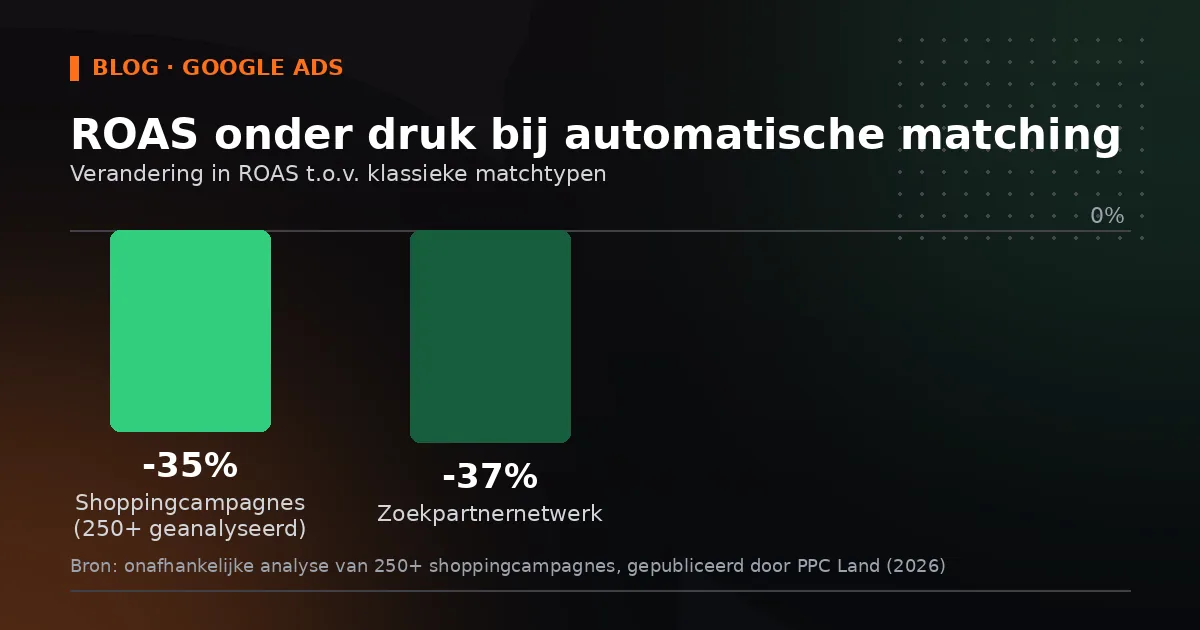
In its own product documentation, Google cites an average increase of around 7 percent in conversions or conversion value at a comparable CPA or ROAS, based on its own 2026 data and excluding retail campaigns. That sounds decent, but independent research paints a less clear-cut picture. An analysis of more than 250 shopping campaigns showed a ROAS roughly 35 percent lower than with classic match types, and on placements within the search partner network that gap widened to 37 percent, as trade publication PPC Land reported. The same source earlier pointed to a sample of around 30,000 search terms in which 99 percent of AI Max impressions produced no conversion at all.
What we often see in the accounts of Dutch SMB advertisers is that click volume stays fairly stable in the first week after a change like this, while the mix of search terms quietly shifts. As a result, the first reports suggest little is going on, while the quality of the traffic really is changing.
We almost always recommend switching text customisation off and then switching it back on while testing, SEA specialist Tim Luijk told trade blog Zeo.
That approach makes sense. You lose nothing by starting cautiously, and you can always re-enable the feature in a controlled way once you have a baseline.
Campaign-level language targeting is disappearing too
Separately from the AI Max migration, Google is scrapping the campaign-level language setting for regular Search campaigns and for AI Max for Search at the end of September. Your ads will then be matched automatically based on the language of your ad copy, with the user's language preference as an additional signal. For Performance Max the same applies to the Google Search channel, but on YouTube, Display and Gmail the language setting within PMax simply remains.
For accounts that advertise across several language versions, for example an online shop with a Dutch and a French landing page for the Belgian market, this is no small matter. Mutations that add language criteria through the API will return the error OPERATION_NOT_PERMITTED_FOR_CONTEXT. So make sure your ad copy and your landing pages are unmistakably in the right language, because from now on that is the only signal Google steers by.
What you can check this week
A few concrete steps you can take today, even if you are not a developer and only work with the regular interface.
- Filter Google Ads for campaigns with broad match keywords or automatically created assets, and note the current budget, CPA and ROAS of the past thirty days per campaign as a baseline.
- Check per campaign whether text customisation is on. For campaigns that came from automatically created assets, it is on by default after migration.
- Tidy up your negative keyword list before the migration kicks in, because search term matching reaches wider than classic broad match did.
- Check whether your landing pages and ad copy are consistently in the target language, with the removal of language targeting at the end of this month in mind.
- Set up monitoring at campaign level, for example with a weekly label or a separate report, so you spot a drop in ROAS immediately rather than two months later.
If you work with a daily budget under 20 euros, bear in mind that AI Max copes less well when a campaign is structurally limited by budget. Google's own documentation says so in as many words. A tight budget and automatically wider matching is not a good combination, because the system may then spend your budget on search terms just outside your core offer instead of on the keywords that already convert well.
Common mistakes
The most common mistake is doing nothing and only looking at the search terms report in October. By then you will have run a month of budget on settings you did not choose yourself. A second mistake is switching text customisation off manually straight away without first looking at what it does. Sometimes it works fine, especially for campaigns with a strong brand name and clear product copy. Rather than switching it off blindly, test it for a week with a small part of your budget, and only then decide.
A third pitfall is assuming this only affects large advertisers. It is precisely the smaller SMB accounts that have often been running on simple broad match keywords for years, because that was the recommended setting at the time. Those campaigns are just as much part of the migration as a large e-commerce account.
Read also: Language targeting disappears from Google Ads, a second change taking effect at the end of September that affects your campaign structure.
Frequently asked questions
Can I still stop the automatic migration to AI Max?
No. For campaigns already running on broad match keywords or automatically created assets, Google carries out the migration between 1 and 30 September regardless. What you can do is manually switch the individual components, such as text customisation or search term matching, on or off in the campaign settings after the migration.
Should I remove all my campaign-level language settings now?
Not necessarily, but do not wait too long. The setting disappears automatically at the end of September for Search campaigns and for AI Max for Search. Above all, make sure your ad copy and landing pages are already in the right language, so the system still matches correctly without that setting.
Does AI Max also work well with a small monthly budget?
That depends heavily on your situation. Google itself states that the feature works less effectively when a campaign is limited by budget. With a tight budget it is wise to monitor for a week or two first before letting text customisation or wider matching run free, so you do not needlessly lose budget to search terms that are just off target.