
Google Ads Damien·Team Lead SEA
Language targeting disappears from Google Ads: what it means for multilingual campaigns
Damien·Team Lead SEA Google Premier Partner
 Meta Business Partner
Dropshippers hit Merchant Center disapprovals more often, through delivery times, prices and product data. These are the rules and how to avoid a suspension.

With dropshipping, the chance of a Merchant Center disapproval is demonstrably higher than for a store holding its own stock, simply because you depend on a supplier for delivery times, inventory and sometimes even the product photos. The three biggest risk areas are always the same: a delivery time your feed promises but the supplier does not deliver, a price that is not identical everywhere, and product data that is too thin or too generic. Each of the three can lead to individual products being disapproved, but when repeated or serious it can also lead to your entire account being suspended. The good news is that Google describes fairly precisely where the boundaries lie, and that most problems can be avoided with settings you can still adjust today.
When you hold your own stock, you set the delivery time, the price and the product photos yourself. With dropshipping, that shifts to your supplier. The supplier adjusts prices or stock without you knowing straight away, and your store feed then lags behind reality. What we often see with dropshippers who are just starting out is that the feed is set up with a standard delivery time of a few days, while actual shipping from abroad can take weeks. That exact gap between promise and reality is what Google checks. It is also the first thing we look at in Google Ads for dropshippers: only once the feed promises what the supplier delivers is scaling up responsible.
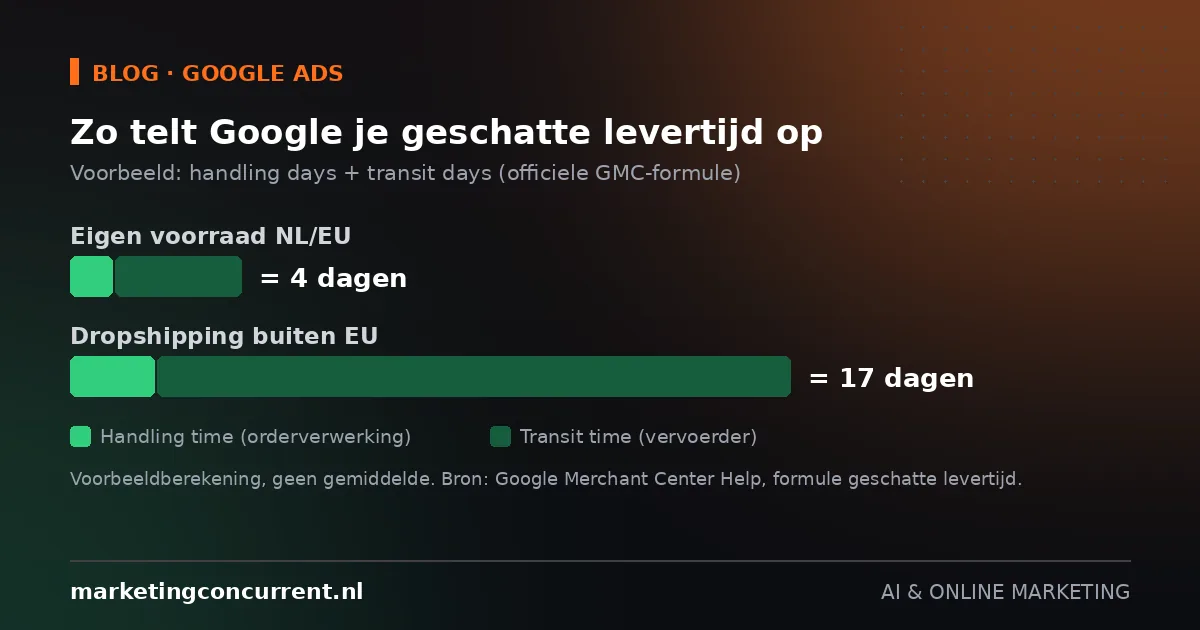
Google calculates the estimated delivery time shown to customers as the number of working days for order processing (handling time) plus the number of working days for delivery by the carrier (transit time), counted from your cut-off time. If you do not enter a cut-off time, Google defaults to 08:00 Pacific Time. If part of the processing or transport coincides with a recognised public holiday, Google automatically adds a day.
The problem is that this setting is rarely updated once a supplier changes or a shipping method changes. If your supplier ships via a cheap, slow route, your transit time has to reflect that, even if it means a delivery time of two to three weeks. Setting an optimistic delivery time to look more attractive backfires. As soon as customers complain en masse or Google detects the actual delivery time, a disapproval for inaccurate delivery time follows.
There is another reason to take this seriously. Google now rewards stores with fast delivery with a "fast shipping" badge and a "get it fast" filter in Google Search, with a speed threshold that differs per country. For dropshippers with delivery times of two to four weeks, that badge is out of reach anyway, which puts visibility under further pressure compared with competitors running faster logistics. All the more reason to at least get the basics right: an accurate delivery time.
Under its "inaccurate prices" policy, Google requires the price in your feed, on your product page, in any structured data and at checkout to be exactly the same. The last point in particular often goes wrong for dropshippers. The supplier raises the purchase price, you forget to update your feed, and the price a customer sees at checkout differs from what the ad showed.
You are allowed to charge extra costs, as long as you show them clearly. Shipping costs you charge separately are set up in Merchant Center as separate shipping costs, not as an amount that only appears at checkout. The same applies to the broader misrepresentation policy: hidden costs, from administration fees to mandatory memberships, must be visible upfront and clearly laid out.
To prevent price drift, you can enable automatic updates. Merchant Center then periodically reads the structured data on your product pages and automatically corrects price and stock data when they deviate from your feed. Google is clear about this itself: automations do not replace regular, manual feed updates and only cover part of your range. If your supplier prices change several times a day, Google recommends uploading on a fixed schedule via the Merchant API rather than relying on automatic updates alone.
With product data, identifiers are where things go wrong most often. A missing or incorrect GTIN, or a GTIN that does not belong to the stated brand, means the product is not synchronised and is therefore disapproved. This is common in dropshipping, because supplier feeds sometimes skip GTINs or link them to the wrong variants.
Images are another constant source of disapprovals. Generic placeholders, logos instead of product photos, or a promotional text overlay on the image all lead to disapproval. The minimum image size is 100 by 100 pixels for most products and 250 by 250 pixels for apparel. In dropshipping, the temptation is to simply reuse the supplier's photo. That is allowed, as long as the photo meets the quality requirements and shows the actual product, but it does reduce your chances of standing out among other sellers of the same product.
For apparel and accessories, attributes such as gender, size, colour and age group are mandatory. If they are missing, the products are disapproved without your account being immediately at risk. It does add up, though. Many individual disapprovals in a short period count towards the assessment of your entire account.
When a policy is violated, Google first sends a warning with a description of the problem and a deadline to fix it. For a number of violations, there is a minimum warning period of seven days before an account is actually suspended. Repeated or serious violations, such as structural misrepresentation of your business, can lead to suspension without that prior warning.
The warning period is there to fix things, not to wait things out. Solve the underlying cause first, then deal with the notification.
After a suspension, you can request a review. That usually takes three to seven working days. Only request a review once you have actually fixed the underlying cause, not just the visible symptom. If the review is rejected, a waiting period follows during which you cannot submit a new request. Use that time to go through your website, feed and account details thoroughly instead of trying again straight away. Creating a new account to get around the suspension is explicitly prohibited under Google's policy against abuse of the network, and in practice makes recovery harder rather than easier.
Read also: Stop wasted budget with the search terms report, for the search campaigns running alongside your Shopping campaigns.
Not sure whether your account is ready to scale? A senior strategist reviews your Google Ads account and Merchant Center beforehand and tells you honestly where the risk lies. Request a free account analysis.
Yes, dropshipping in itself is not a violation. Google does not judge your business model, but whether you inform customers honestly and fully about delivery time, price and who is behind the store. As long as that information is correct, there is no reason for a disapproval. You can read how we set up Shopping and Performance Max campaigns on our page about Google advertising.
Respond within the deadline stated in the warning email, often a few days to a couple of weeks depending on the type of violation. Do not wait until the last moment, because the review that follows a fix itself takes another three to seven working days.
Partly, for price and availability, via the automatic updates in Merchant Center. Not for product data such as GTINs, images and attributes. You adjust those yourself in your feed or product source; automation does not step in for you there.
Leads the SEA team and manages Google Ads accounts for online stores and dropshippers every day, from Shopping structure to bidding on margin. Questions about this article? Book a strategy call or meet the whole team.
Damien·Team Lead SEA Damien·Team Lead SEA